
ArchiCAD
ArchiCAD & Building Information Modelling (BIM)
ArchiCAD is your technical tool for precise design. While Blender is great for "art," ArchiCAD teaches you the precision of BIM (Building Information Modelling). You will use it to generate accurate plans, sections, and elevations—these are essential for your Visual Communication standards.
You can use ArchiCAD to create the "shell" of your level, ensuring all the measurements are perfect, and then export it to a rendering engine. This workflow mimics the real professional industry, bridging the gap between construction documents and virtual experiences.
|
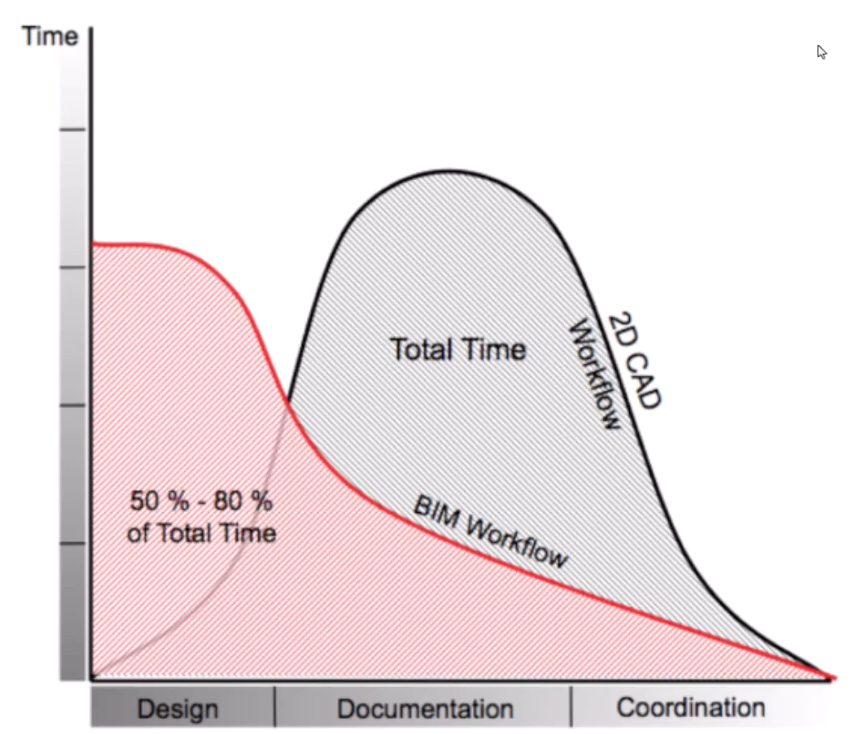
2D CAD vs BIMIn the image, you can see the difference between traditional CAD (Computer-Aided Design) and BIM. CAD focuses on creating 2D drawings, while BIM allows for a 3D model that contains rich information about the building's components. This is why ArchiCAD is a powerful tool for your design process, as it enables you to create detailed and accurate models that can be easily modified and rendered. Using this method increases efficiency and accuracy in your design workflow, because once you have learnt the tools design happens in the software that you are using. You don't have to go back and forth between drawing, drafting and then software in order to develop your designs. |