2D Animation
Key Animation Concepts
The History of Animation |
Frames & Shots

Frames |
A frame is a single still image. |
Shots |
A shot is a series of frames from a particular camera angle. |
Frame Rate |
The number of frames displayed per second. Standard frame rates are 24. But animations can be done at 12, 15, or 30 fps depending on style and medium. Making animations at a lower frame rate can give a choppier, more stylised look and means you only draw half as many frames as 24 fps. This is called drawing on 2's. You can also draw every 3rd or 4th frame, called drawing on 3's or drawing on 4's. |
Numbered Shots

Single Shot |
A single shot is a shot with only one character. |
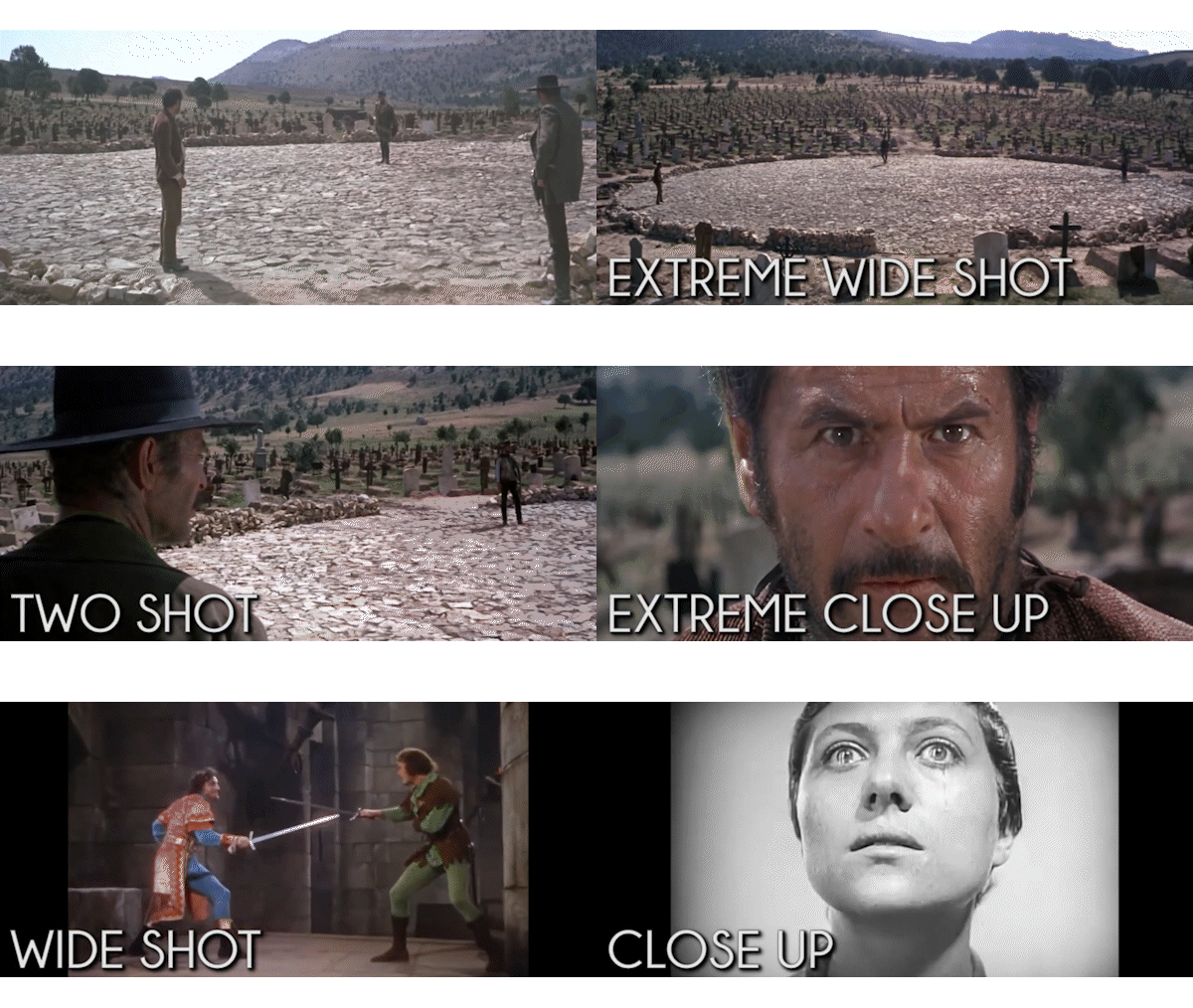
Two Shot |
A two shot is a shot with two characters. |
Three Shot |
A three shot is a shot with three characters. The shot number is equal to the number of characters in a shot. The more characters in a shot, the more complex the composition becomes. |
Vertical Angles

Vertical - Low Angle |
A low angle is when the camera is positioned below the subject, looking up. This can make characters appear more powerful, dominant, or intimidating. |
Vertical - Straight Angle |
A straight angle (mid angle) is when the camera is at the same level as the subject, looking straight on. It provides a neutral perspective and is often used for dialogue scenes. |
Vertical - High Angle |
A high angle is when the camera is positioned above the subject, looking down. This can make characters appear smaller, weaker, or more vulnerable. It can also show a broader view of the scene, giving context and emphasizing the environment around characters. |
Used in Combination |
A bully and a victim can be shown using a combination of high and low angles to emphasize power dynamics. A group of friends can be depicted using high, straight, and low angles to highlight relationships, for example: leader in low angle, neutral character in straight angle, shy character in high angle. |
Composition - The Rule of Thirds

The Rule of Thirds |
This is the most popular rule in composition. Imagine dividing your screen into nine equal rectangles with two vertical and two horizontal lines. Place important elements (like eyes or a key prop) along these lines or intersections. |
Why Use It? |
Avoiding boredom: placing subjects dead-center can feel static or mugshot-like. Shifting them to the side creates a more dynamic, professional look. |
Looking Room |
In animation, if a character is on the left third line looking right, it creates empty space for them to look into. This helps the audience subconsciously understand that the character is interacting with the world, not just the camera. |

Shot Sizes - Field of View

Extreme Wide Shot (EWS) |
The establishing shot. It captures the vast scale of the environment (like a city or desert), making characters appear small and giving context for location. |
Wide Shot (WS) |
The full-body shot. It frames the character from head to toe and is best for physical action and showing how they fit into their surroundings. |
Medium Shot (MS) |
The conversation shot. It frames from waist up and is common in dialogue because it captures facial expression and body language. |
Close-Up (CU) |
The emotion shot. It frames head and shoulders to isolate the character and focus attention on feelings. |
Extreme Close-Up (ECU) |
The intensity shot. It zooms into a feature such as eyes or mouth to create intimacy, discomfort, or dramatic realization. |
Detail Shot (DS) |
The information shot. It focuses tightly on an object (like a clock, text message, or weapon) to signal that item is critical to the plot. |
Horizontal Angles

Horizontal Angles |
The further the camera is from straight-on perspective, the more neutral and objective the view becomes. As you move away from straight angle, the audience often feels less connected to the character. |
Frontal View |
A frontal view is a shot from the front. This view is good for emotional scenes and gives the clearest angle to read character emotion. |
Side View |
A side view is a shot from the side. It can soften scene impact by offering a less direct perspective. When a character behaves poorly, this angle can distance the viewer and make behaviour seem less severe. This angle is often used to show conflict, movement, and interactions that are aggressive or romantic. |
Rear View |
A rear view is a shot from the back. If frontal shots provide the most personal view, rear view generally provides the most impersonal view. |